• Members of the previous forum can retrieve their temporary password here, (login and check your PM).

Mixing digital and traditional art techniques: A tutorial

Migrated topic.

Guyomech

Rising Star
OG Pioneer
Joined
Dec 22, 2011
Messages
2,077
Merits
42
There are countless ways to make a picture, especially now that we have digital tools at our disposal. Many artists are interested in branching out from traditional analog methods into the digital world, but aren't sure where to begin. I think a good way to go is to start by mixing analog mediums with digital techniques. This can be as simple as scanning a painting and then playing around with filters and such, or it can be a much more involved process. The example I've included here mixes a number of different techniques: Plain old graphite, colored pencil, a little bit of paint, and lots of Photoshopping.

This example is from a collaborative tattoo design project that I did with my friend Don McDonald, who has done a lot of the tattoo work in my own collection. It was a greeat method to erase the geographic distance between us and be able to take turns on the project without having to mail stuff back and forth. But these same methods could apply to a non-collaborative project.

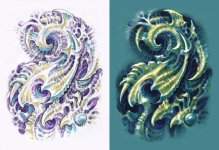
In the first two images attached below, you can see the intital sketch that Don sent me. He kept it simple so that I'd have plenty of room to play around with it. Notice the inset, where the image has been lightened to about 15% in value (do this in Levels: Command/L, then move the bottom left lever most of the way to the right). After printing this, I retraced over the whole thing in graphite, keeping much of it the same, changing other parts, and then shading it.
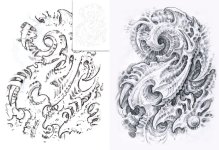
 

Attachments

  • DonGuyCollab1-2.jpg
    DonGuyCollab1-2.jpg
    424.5 KB · Views: 0
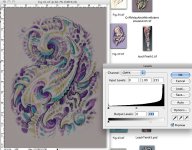
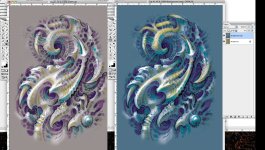
In the third image, you can see some color that Don added in Photoshop. It was one of his first ventures into PS painting, so he didn't get too carried away. Then, to the right, you can see where I took it in Photoshop using a combination of Levels, dodging/burning, and multiple layers to create some simple foundation color. In the images below that you can see the steps taken to get there: First, the image was darkened using Levels: Command/L, then the lower right lever was slid to the left until all the whites had been turned into a medium neutral gray. In the image after that, the Dodge and Burn brushes were used to selectively bring some of the high points of the design back up toward white, then some of the shadows were deepened.

Next, I duplicated the layer (Layer/Duplicate Layer), made the top layer invisible by clicking off the little eye icon to the left of it in the Layers Palette, then selecting the bottom layer. I then made this layer light tannish yellow by going to Image/Adjustments/Selective Color, selecting Neutral, then pumping up the yellow (feel free to play around with all the levers, see what happens!). Then I turned the top layer back on and selected it, went back to Selective Color, selected Neutrals again, and pumped up the cyan and magenta, then did the same to the blacks. Once this was OK'd, I used the eraser to erase out parts of the top layer to reveal the yellowish layer underneath.

This is a great way to do simple, rough color without disturbing your outlines and shading. Anyway, those are the steps taken to get it to the rough colored version; I then emailed it back to Don.
 

Attachments

  • DonGuyCollab3-4.jpg
    DonGuyCollab3-4.jpg
    483.9 KB · Views: 0
  • GrayLevels.jpg
    GrayLevels.jpg
    249.4 KB · Views: 0
  • DodgeBurnErase.jpg
    DodgeBurnErase.jpg
    417.5 KB · Views: 0
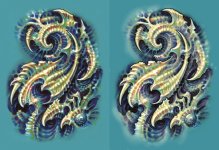
He then printed it on heavy matte paper and worked it with colored pencils (I recommend Prismacolor pencils- all other brands are frustrating by comparison) and then added highlights with white acrylic paint. In the final image, you can see some subtle tweaking I did with Photoshop to smooth out some of the shadows and highlights, mostly using a large brush and dodge/burn. I then went through and added some fine detail using a small paintbrush.

I highly recommend a Wacom tablet for all digital art processes. They are inexpensive and massively useful..If any of you have technical questions about any of this, please feel free to post them here.
 

Attachments

  • DonGuyCollab.jpg
    DonGuyCollab.jpg
    529.7 KB · Views: 0
Sweeeeeeeeeet!

Thanks for putting this together, Guyomech! After reading your posts in the art bin I went out looking for colored pencils earlier to find that all the prismacolor vendors are closed for the holiday today. I was curious about what is usually preferred for printing/paper specifics and the rest of transferring and working with the physical side of the art so imagine the timing when I look here ;)

Running late because I stopped to read this but I'll stop back by when I have time. In the meantime you have my heart and mind's gratitude.
 
Awesome Guyo!

I'll be getting a wacom very soon and have been trying to refresh my drawing skills in preparation. I am very interested in digital painting and this tutorial is immensely helpful, thank you!
 
Awesome thread Guy!
It has become clear to me the power of mixing mediums and different styles. It definitely adds a greater depth and impact. I think I need a bit more practice in general before I begin tweeking pixels, but it's definitely one of the roads I plan to take.
 
Mr. P- you're one of the people I had in mind when I made this thread.

Next time you have a black and white drawing that you want to play with in color, try taking the steps outlined above where the layer is duplicated (one duplicate layer for each color you want), the color of each layer is changed using Selective Color, and the eraser is used for adding and blending color. Let me know if you want to try this and need more detailed instructions.
 
Hells yes! If you think it would be a good choice for me, I'm in!

I should have more time in the coming month to play around with such things, as I'll be out of school for a while. Usually my drawing occurs when I can fit it in, on lunch and in the evenings before bed. Because of this I often don't have the time to expand my skills into new areas until I'm done with school for a bit.

I have a few black and white drawings that I think could use some color, but don't want to mess up trying on the actual paper. Now that you mention it, I think digital would go well with these.

What program do you recommend?
 
Mr.Peabody said:
What program do you recommend?

P...
For your needs I would recommend Photoshop (CS6) and/or Painter 12. There are plenty of smaller paint programs that do fine jobs...but these are the Daddies.
Easily available for free (if you know where to look..ahem torrents) or I can let you have copies.

You won't regret it (hope you've got a scanner) :thumb_up:
 
Cool! Thanks! I'm looking forward to giving this a try.

Now if I could just make the time to format some pictures and upload them to the new art gallery server...... Maybe my first task for photoshop!
 
This is such perfect timing. Ive been looking into getting a drawing pad thingy to do digital work.
Ive been looking at the Wacom Intuos and it looks pretty sweet. Cant wait to give it a whirl :)
 
There's a bit of an adjustment period- about a week- but once you get used to it you'll never turn back.

If you want, go ahead and email me one of your funky critter sketches (use the address in the gallery announcement). When I get time I'll do a demo from it and use that to extend this thread.
 
So is the drawing pad absolutely necessary? I don't know how soon I'll be able to buy one, my budget is pretty tight. I know it would make it a lot better, but I'm hoping a mouse will work almost as well, maybe just a little more work.
 
Mr.Peabody said:
So is the drawing pad absolutely necessary? I don't know how soon I'll be able to buy one, my budget is pretty tight. I know it would make it a lot better, but I'm hoping a mouse will work almost as well, maybe just a little more work.

P... not absolutely necessary..but certainly helps if you're into fine detailed strokes or sweeping arcs...
Small ones are very cheap.
Mouse work is fine but small sweeps are tedious and painful...depends what you do really.

(apologies if I'm answering for Guy (it's his thread)...I know he's not on 24hr Nexus watch...he's a talented and busy man)😉
 
Cyb, you are absolutely qualified- and welcome- to be weighing in here... At this forum there is no "my" thread; they are all ours.
 
Cool! That's what I was thinking. I've been fooling around a bit with the photoshop. It's so much better than Corel, which I had been using.

And cyb, seriously? You're super qualified. Getting advice from you guys has been like mana from heaven.
 
Thank you!

I am little by little waking up my art/drawing/painting side, and really appreciate the techs, tutorials, nudges and positive reinforcement that this forum, you folks, all offer up. It's a good feeling to read comments, see people's work- mind blowing work!
 
Back
Top Bottom